ASCII
ord() and chr()
# a text like this one

text1 = "abcd\nefgh\n"
is actually encoded in memory according to ASCII:
https://
# and to confirm that, we can use ord()
# which applies on a single char (raises an exception otherwise)

for c in text1:
    print(f"{c} -> {ord(c)}")
a -> 97
b -> 98
c -> 99
d -> 100
-> 10
e -> 101
f -> 102
g -> 103
h -> 104
-> 10
# FYI, note we also have the reverse function, pour info, qu'on a aussi la fonction inverse de ord
# qui s'appelle chr()

chr(97)'a'write into a text file
from pathlib import Path# remember to always use a with: when dealing with files
with Path('encodings1-utf8').open('w', encoding='UTF-8') as f:
f.write(text1)inspect that file with a hex editor - e.g. you can use vs-code and install the HEX Editor extension
you will see that, with ASCII-only characters, your file has exactly one byte per character
non-ASCII & UTF-8
let us now consider a text with French accents and cedilla - any non-ASCII character would do
text2 = "abçd\néfgh\n"inspection
# notice the values > 127
# which are not supported in ASCII

for c in text2:
    print(f"{c} -> {ord(c)}")
a -> 97
b -> 98
ç -> 231
d -> 100
-> 10
é -> 233
f -> 102
g -> 103
h -> 104
-> 10
# focus on the 2 characters whose encoding is > 127

hex(231), hex(233)
('0xe7', '0xe9')bin(231), bin(233)('0b11100111', '0b11101001')again, note that chr() and ord() are the inverse of one another
chr(231), ord('ç')('ç', 231)write into a text file
with Path('encodings2-utf8').open('w', encoding='UTF-8') as f:
    f.write(text2)
read back
# no encoding in binary mode, would make no sense !

with Path('encodings2-utf8').open('rb') as f:
    raw = f.read()
and as we read bytes here, and we have more bytes than the initial text had characters
len(raw), len(text2)(12, 10)it adds up, since the each of the 2 alien characters will need 2 bytes each to be encoded
(European characters usually take 2 bytes; some more exoctic chars can take 3 or 4 bytes)
UTF-8 logic
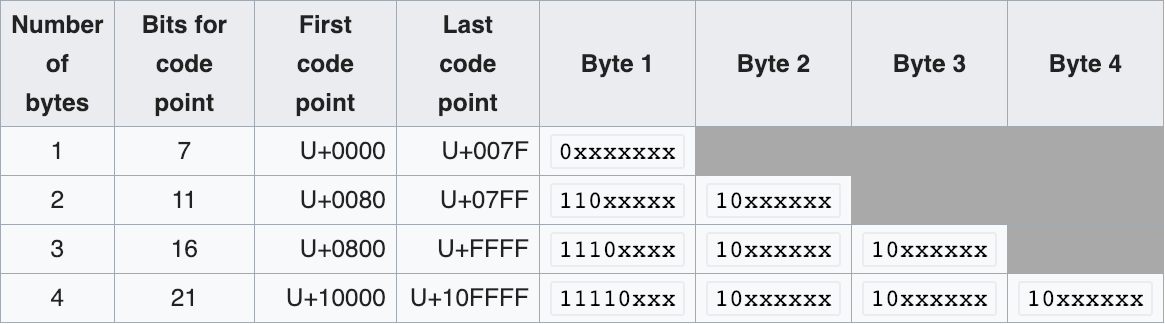
this table describes how the UTF8 encoding works:
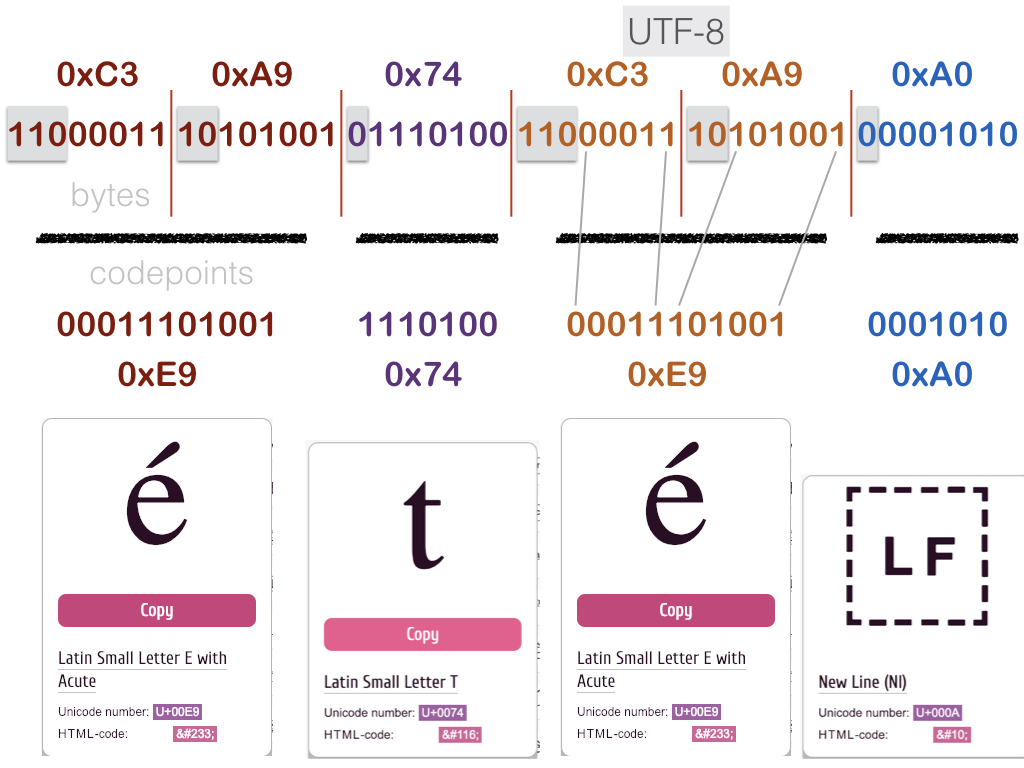
a visual example
on a sample 4-characters string: été\n
let’s check that
on our own data
# here is it again
rawb'ab\xc3\xa7d\n\xc3\xa9fgh\n'let us number the contents of raw
012   3   45 6   7   89
ab\xc3\xa7d\n\xc3\xa9fgh\n
# extract the 2-bytes areas for each alien character
ccedilla = raw[2:4]
eaccent = raw[6:8]for b in ccedilla:
print(f"byte {b} {hex(b)} {bin(b)}")byte 195 0xc3 0b11000011
byte 167 0xa7 0b10100111
for b in eaccent:
    print(f"byte {b} {hex(b)} {bin(b)}")
byte 195 0xc3 0b11000011
byte 169 0xa9 0b10101001
sounds good
decode manually (gory details)
this is totally optional of course, but if we wanted to do the decoding ourselves...
(you may skip to the next section)
# we want 5 bits from the first byte and 6 from the second byte

on2bytes_0_len = 5
on2bytes_1_len = 6

# and that's what should occur in the remaining (left-hand-side) bits
on2bytes_0_pad = 0b110
on2bytes_1_pad = 0b10
def mask_from_len(length):
"""
for e.g. len == 5, we compute a mask that has
3 bits set and 5 bits unset (because 3+5=8)
"""
return 2**8 - 2**length# let us check that it works as advertised:
# e.g. for byte0
# the result allows to separate
# the (3-bits) padding from
# the (5-bits) payload
bin(mask_from_len(5))'0b11100000'# with that we can manually decode 2-bytes UTF-8 !
on2bytes_0_mask = mask_from_len(on2bytes_0_len)
on2bytes_1_mask = mask_from_len(on2bytes_1_len)
def decode(on2bytes):
b0, b1 = on2bytes
# check masks
# e.g. check that the 3 high bits in 0xc9 are indeed 0b110
assert (b0 & on2bytes_0_mask) >> on2bytes_0_len == on2bytes_0_pad
# same on byte 1
assert (b1 & on2bytes_1_mask) >> on2bytes_1_len == on2bytes_1_pad
# extract meaningful bits
# for that we just need to invert the mask
bits0 = b0 & ~ (on2bytes_0_mask)
bits1 = b1 & ~ (on2bytes_1_mask)
# asemble bits into codepoint
# b0 has the high bits so it needs to be shifted
# by the number of meaningful bits in byte1
codepoint = bits1 | bits0 << on2bytes_1_len
return chr(codepoint)# and indeed
decode(eaccent), decode(ccedilla)('é', 'ç')exercise
use this table to write a complete UTF-8 decoder
UTF-32
let us now take a quick look at the UTF-32 encoding
this is a fixed size encoding, meaning each character will use 4 bytes
this is convenient e.g. when you need to do direct access to the character in a file
write with UTF-32
let’s write our text with 2 alien characters in a second file
with Path("encodings2-utf32").open('w', encoding='utf-32') as f:
    f.write(text2)
size and BOM
however the total file size is not exactly , and this is due to something called the BOM (Byte Order Mark)
# computing file size: use pathlib !

p = Path("encodings2-utf32")
print(f"file has {p.stat().st_size} bytes")
file has 44 bytes
len(text2)1044 is because
4 * 10 chars = 40 bytes
plus 4 bytes for the BOM located in the first 4 bytes
# read the 4 first bytes

with Path("encodings2-utf32").open('rb') as f:
bom = f.read(4)bomb'\xff\xfe\x00\x00'which indeed matches the UTF-32 little-endian (LE) BOM as shown on Byte order mark
decoding is way easier
with that in mind, it is easier to
compute the location of a given character from its rank in the string
and to decode the raw binary stream
for example: decode the ç in our initial string
# read the whole file

with Path("encodings2-utf32").open('rb') as f:
    raw = f.read()
# remember that ç is at index 2
index = 2
text2[index]'ç'so this means it gets encoded in the file on 4 bytes starting at offset
4 + 4 * index
offset = 4 + 4*index

b4 = raw[offset:offset+4]

b4b'\xe7\x00\x00\x00'because it is little endian - see Endianness - it means we have to mirror the data bytes to get the actual value
# int.from_bytes knowns how to transform a sequence
# of bytes into an int, given the endian-ness

int.from_bytes(b4, 'little')231# and indeed, that is what was encoded in the file !
chr(231)'ç'